Header Reseller Branding

  • Home
  • Frequently Asked Questions
    • Logging into the Control Panel
    • Changing Name Servers of a Domain Name
    • Managing DNS Resource Records
    • Using the Web Hosting Service
    • Explaining Domain (Transfer) Secret or Authorization (Auth) Code and How to Obtain it from your Current Registrar?
    • Transferring a Domain Name from Another Registrar to Answerable.com
    • Domain / URL Forwarding
    • Customer Control Panel Guide
    • Registering and Managing Child Name Servers
    • Using the DNS Service
    • DNS and types of Resource Records Answerable.com allows
    • Using the Free Email Service
    • Listing, Searching and Managing Domain Name Registration Orders
    • Uploading Content to your Website
    • Moving or Pushing a Domain Name from one Customer Control Panel to another
    • What are the permitted Countries of Operation?
  • Logging into the Control Panel
  • Domain Names
    • Listing, Searching and Managing Domain Registration Orders
    • Changing Name Servers of a Domain Name
    • Managing Whois or Contact Details of Domain Names
      • Modifying the Whois (Contact Details) of Domain Names
      • Modifying the Whois / Contact Details of a .UK Domain Name
      • Managing Contacts from within the Customer Control Panel
      • Hiding Contact Details through Privacy Protection in the Whois of a Domain Name
        • Defining Privacy Protection
        • How can People Contact you if you Enable Privacy Protection for your Domain Name?
        • Purchasing / Renewing Privacy Protection
        • Enabling/Disabling Privacy Protection for a Domain Name
        • How can you Enable/Disable Privacy Protection of Multiple Domain Names?
      • Resellers: Controlling the display of your Brand Name in the Whois Lookup Results for .COM / .NET Domain Names
      • Checking the Whois for a Domain Name
      • Hiding/Publishing Registrant Organization in the Whois of a Domain Name
      • Hiding/Publishing Contact Details in the Whois of a .TEL Domain Name
      • Hiding/Publishing Contact Details in the Whois of a .CA Domain Name
    • Hiding Contact Details through Privacy Protection, in the Whois of a Domain Name
    • GDPR
      • What is GDPR?
      • Managing GDPR Protection settings
    • Transferring a Domain Name
      • Confirming if a Domain Name can be Transferred
      • Transferring a Domain Name from Another Registrar to Answerable.com
        • Explaining Domain (Transfer) Secret or Authorization (Auth) Code and How to Obtain it from your Current Registrar?
        • Transferring your Domain Name
        • Transferring a .UK Domain Name
        • Bulk Transfer
        • Cancelling a Domain Name Transfer
        • Important - Domain Name Transfer Caveats
      • Transferring a Domain Name from Answerable.com to Another Registrar
        • Transferring a Domain Name to Another Registrar
        • Transferring a .UK Domain Name to Another Registrar
        • IMPORTANT: Domain Name Transfer Caveats
        • Fast Transfer
          • What is fast transfer?
          • How do I opt-in my domain name for Fast Transfer?
          • How do I find and opt-out names from the Fast Transfer service?
      • Domain Name Transfer Caveats
        • Understanding the Status of a Domain Name Transfer
        • Lost One Year when Transferring a Domain Name from One Registrar to Another
        • Domain Name Transfer Completed but Domain Name is Still Inactive
      • Locating and Modifying the Domain (Transfer) Secret/Authorization Code for a Domain Name
    • Deleting a Domain Name
    • Protecting/Locking a Domain Name
    • Domain Protect+
    • Registering and Managing Child Name Servers
    • Suspending / Unsuspending Domain Names
      • Suspending / Unsuspending a Domain Name
      • Bulk Suspension / Unsuspension of Domain Names
    • Renewing Domain Names
      • Renewing a Domain Name
      • Bulk Renewal of Domain Names
      • Understanding Domain Name Expiry and Display of a Parking Page
    • Domain Name System Security Extensions (DNSSEC)
      • What is DNSSEC?
      • Adding Delegation Signer (DS) Records
      • TLDs supporting DNSSEC
    • Domain Name Registration Default Settings
    • Viewing Action History
    • Restoring a Deleted Domain Name from the Redemption Grace Period
    • Domain Name Registration Caveats
      • Overview of TLDs (Domain Name Extensions)
      • Interpreting Domain Name Check Availability Results
      • Interpreting Order Locked In Processing Messages
      • Support for Internationalized Domain Names (IDN)
      • .ASIA Domain Name Rules/Requirements
      • .CA Domain Name Rules/Requirements
      • .CO Domain Name Rules/Requirements
      • Understanding .EU Domain Names
        • .EU Domain Name Rules/Requirements
        • Understanding .EU Domain Name Contacts
      • .JOBS Domain Name Rules/Requirements
      • .ME Domain Name Rules/Requirements
      • .MOBI Domain Name Rules/Requirements
      • .NAME Domain Name Rules/Requirements
      • .NZ Domain Name Rules/Requirements
      • .PRO Domain Name Rules/Requirements
      • .PW Domain Name Rules/Requirements
      • .SC Domain Name Rules/Requirements
      • .TEL Applications
      • .TEL Domain Name Rules/Requirements
      • .UK Domain Name Rules/Requirements
      • .US Domain Name Rules/Requirements
      • .VC Domain Name Rules/Requirements
      • .CO.ZA Domain Name Rules/Requirements
      • .IN Restricted Email List
      • Identifying CentralNic Domains
      • Premium Domains
      • Sunrise Period
      • Identifying New gTLD Extensions
      • New gTLD Wishlist
    • Whois Data Verification
    • Whois Data Reminders
    • DNS
    • Domain / URL Forwarding
    • Domains Product Maintenance Notices
  • Hosting
    • Single Domain Linux Hosting
      • Accessing your Single Domain Linux Hosting Package
      • IMPORTANT: cPanel Single Domain Linux Hosting Package User Guide
      • RESELLERS: Read this to Setup your Single Domain Linux Hosting Business
    • Single Domain Windows Hosting
      • Accessing your Single Domain Windows Hosting Package
      • IMPORTANT: Plesk Single Domain Windows Hosting Package User Guide
      • RESELLERS: Read this to Setup your Single Domain Windows Hosting Business
    • Legacy Web Hosting
      • Using the Web Hosting Service
      • Listing, Searching and Managing Web Hosting Orders
      • Web Hosting Service Guide
        • How can I view my website in a browser if my domain is pointing elsewhere?
        • SSL
          • Issues that Digital Certificates Address
          • Activate SSL for your Hosting Package
          • Certificate Authority
          • Generating a Certificate Signing Request (CSR)
          • Installing your Digital Certificate
          • Generating a Self-signed Certificate
          • Uninstalling your Digital Certificate
          • Installing your Intermediate CA Certificate or CA Bundle
        • Back-up your Website
          • Adding a Backup Policy
          • Listing/Modifying and Deleting Backup Policies
        • Domain Aliases
          • Domain Alias
          • Adding Domain Aliases
        • Managing your Plesk Windows Hosting package
          • Accessing/Managing your Plesk Windows Hosting package
          • IMPORTANT: Plesk Windows Hosting package User Guide
        • Managing your cPanel Linux Hosting package
          • Accessing/Managing your cPanel Linux Hosting package
          • IMPORTANT: cPanel Linux Hosting package User Guide
          • Migrating your cPanel Linux Hosting package from another Web Hosting company to Answerable.com
      • Upgrading / Downgrading a Web Hosting Order
      • Legacy Web Hosting Deprecation
      • DNS for Web Hosting
    • Sample Scripts
      • Linux Hosting related Scripts
        • PHP-based Form Mail (Feedback) Script
        • Perl-based Form Mail (Feedback) Script
        • PHP Script to Test MySQL Database Connectivity
      • Windows Hosting related Scripts
        • Collaboration Data Objects (CDO)
        • ASP Script to Test MSSQL Database Connectivity
    • Uploading Content to your Website
      • Configuring and using various FTP Clients
        • Should I use Active or Passive mode for FTP?
        • Using FTP software to manage your Content
          • CuteFTP
          • Core FTP
          • SmartFTP
          • WinSCP
          • FileZilla
      • File/Folder Permissions and Groups
      • Do you allow Anonymous FTP?
    • Email Hosting
      • Using the Email Hosting service
      • Email Administrator's Guide - Create and Manage Accounts
        • Managing Mailing Lists
      • Email User's Guide - Access your Email
        • Configuring different Email Clients to send/receive Email
        • Accessing your Email from the Webmail Interface
        • Auto-responders
      • Email Hosting Caveats
        • File extensions that are not allowed as attachments
      • DNS for Email Hosting
      • Domain / URL Forwarding for Email Hosting
      • Personal Email Deprecation
    • Website Builder
      • Setting up your Website Builder Order
      • RESELLERS: Read this to Setup your Website Builder Business
      • DNS for Website Builder
    • Hosting Caveats
      • Purchasing a Hosting Order for Internationalized Domain Name (IDN)
      • Modifying the hosts file
      • Ports open for outgoing connections
      • Debugging Perl/CGI Scripts
      • SMTP Server settings for sending mails through your website
      • Switching PHP Version
      • Shared Hosting Limitations
      • SSH Access
      • SymLinks Settings of cPanel Linux Hosting packages
      • Creating and Restoring Backups in cPanel
      • Creating and Restoring Backups
      • Restriction on upload of executable files under Windows Hosting
      • HTTP to HTTPS Redirection - Apache
      • HTTP to HTTPS Redirection - IIS
      • How do I set the default page?
      • How do I unblock port 80/443 ?
      • How do I add custom error pages for Linux hosting?
      • How do I add custom error pages for Windows hosting?
      • Enable Cloudflare on cPanel
      • Varnish
      • How do I change the Primary domain of my hosting plan?
      • Managing registered email address for scripts
      • Unblocking Email Accounts in cPanel
  • Order Management
    • Listing, Searching and Managing your Orders
    • Locating the Name Servers or DNS Records to Use
    • Directory and File Structure - Linux
    • Directory and File Structure - Windows
    • Enabling SSL or a Dedicated IP Address
    • Renewal Reminder for Orders
    • Renewing, Deleting your Order
    • Upgrading / Downgrading an Order
    • Suspending / Unsuspending an Order
    • Moving or Pushing an Order from one Customer Control Panel to another
    • Bulk Actions
      • Registering Domain Names in Bulk
      • Transferring Domain Names in Bulk
      • Renewing Orders in Bulk
      • Suspending or Unsuspending Orders in Bulk
      • Locking or Unlocking Domain Names in Bulk
      • Modifying Name Servers in Bulk
      • Modifying Contacts in Bulk
      • Enabling / Disabling Theft Protection in Bulk
      • Privacy Protecting Domain Names in Bulk
      • Moving Domain Names in Bulk
      • Listing All Running Bulk Actions
  • DNS
    • DNS and types of Resource Records Answerable.com allows
    • Using the DNS Service
    • Locating the DNS Service Interface
    • Managing DNS Resource Records
    • DNS Caveats
      • No NS A records at Nameservers Failure Message
  • Accessing your Domain Backorder
  • Domain Backorder Setup Guide
  • FAQ
  • Domain / URL Forwarding
    • Using the Domain Forwarding Service
    • Locating the Domain Forwarding Service Interface
    • Managing the Domain Forwarding Service
    • Domain / URL Forwarding Caveats
      • No NS A records at Nameservers Failure Message
  • Free Email Service
    • Using the Free Email Service
    • Locating the Free Email Service Interface
    • Managing the Free Email Service
    • Free Email Service Caveats
      • No NS A records at Nameservers Failure Message
  • Customer Control Panel Guide
    • Creating a Demo Customer Account
    • Logging into the Control Panel
    • Your Profile and Settings
      • Changing your Control Panel Username, Mobile Number and other Contact Details
      • Changing your Control Panel Password
      • Changing your Personal Identification Number (PIN)
      • Setting your Email Preferences
      • Setting your SMS Preference
      • Setting your Language Preferences
    • 2-Step Verification
      • FAQs
      • How do I enable 2-Step Verification?
      • How do I disable 2-Step Verification?
    • Manage Billing
      • Adding Funds in your Debit Account
      • Executing an Order / Balancing an Invoice or Debit Note
      • Cancelling an Order / Invoice
      • Requesting Refund from Answerable.com
      • Listing / Searching your Transactions
      • Locked Funds
      • EU VAT FAQs
      • Service Tax FAQs
      • GST FAQs
      • VAT for Russia FAQs
    • Listing All Orders under your Customer Account
    • Viewing your Login History
    • Viewing all important Announcements posted in your Control Panel
    • Customer Control Panel Caveats
      • Restriction on Change of Country and Legal Name
      • Session Timeout

Creating and Restoring Backups in cPanel

You can create and restore backups of your websites and databases by using the Backup Wizard option from the cPanel on your Linux Hosting order.

You can choose to create a full backup or a partial backup of your website. 

Step 1: Accessing the Backup Wizard.

  1. Access your cPanel from the control panel. 
    • Accessing your cPanel for Single Domain Hosting.
  2. On the cPanel home page, under the FILES section, click Backup Wizard.cpanel backup wizard

Step 2: Creating and Restoring a Backup.

You can choose from the backup options available in the cPanel. The two options available are full backup and partial backup.

i. Full Backup 

Note
  • Full backup files cannot be used to restore your files through the cPanel interface. You need to contact the support team for more information.
  • Before you proceed with backup restore it is necessary to download and compress the backup file.
  • To restore the individual portions of your website, you need to decompress the full backup file and upload it to the wizard and proceed with the restoration. 
  • The backup process may fail if an account is near or over its quota and the system is unable to write the necessary files such as a database lock file. 
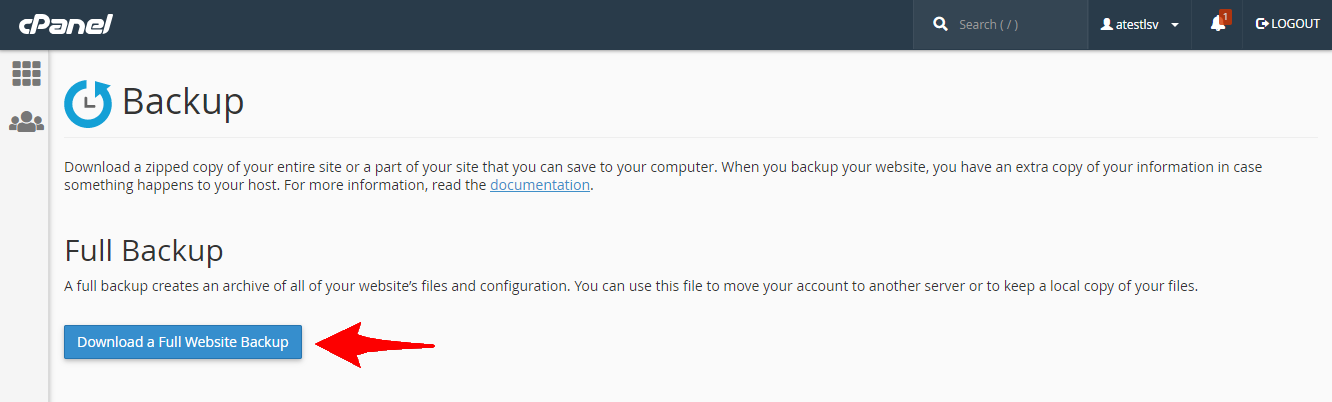
  1. In the Full or Partial Backup section, click Full Backup. select full backup
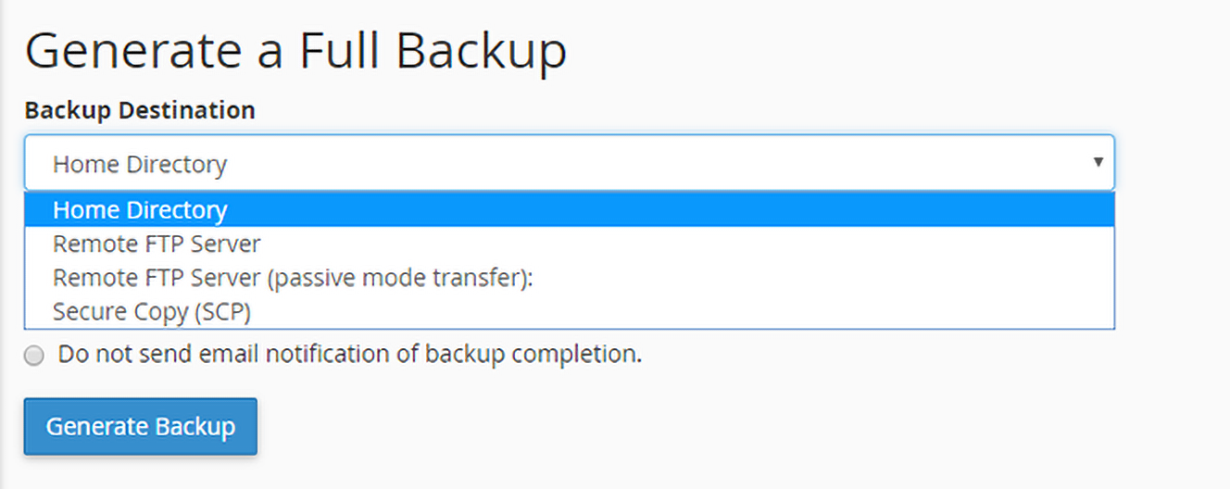
  2. From the Backup Destination drop-down, select the destination where you want the backup to be stored.
    • Home directory - Saves the backup on the server. 
    • Remote FTP server  - Saves the backup on a remote server using FTP.
    • Remote FTP Server (passive mode transfer) - Saves the backup on a remote server using passive FTP.
    • Secure Copy (SCP) - Saves the backup file on a remote server using SCP.select backup destination
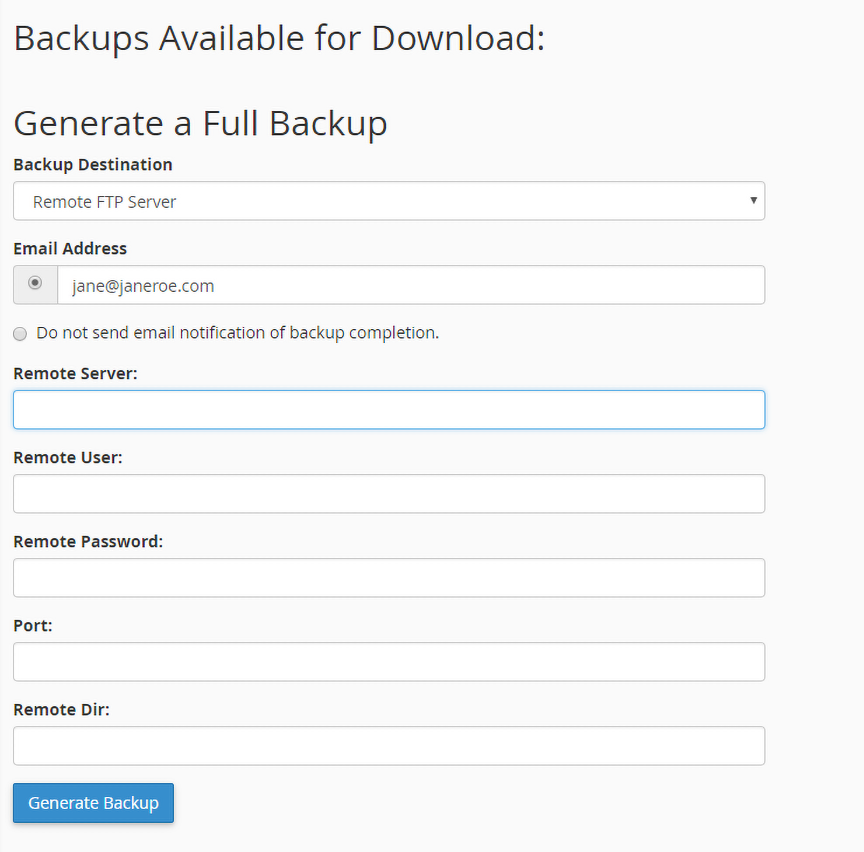
  3. You will have to enter the remote server information in the fields if you select the Remote FTP server, Remote FTP server (passive mode transfer) or SCP.remote backup server configuration settings
  4. Select the option to receive an email notification when the backup process finishes or select Do not send email notification of backup completion if you do not want to be notified. choose email notification
  5. Click Generate Backup. You will see a confirmation message.
  6. Click Go Back to return to the Download section.
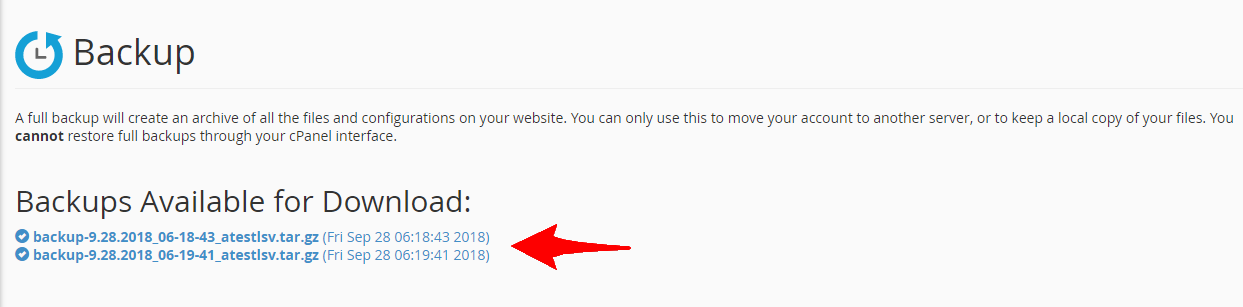
  7. You can download the backup by clicking on the link under Backups Available for Download.download backup
    Note

    If you selected the Home Directory option, click the filename in the Download section of the interface to download the backup file.

    • The backup file's creation date appears in the filename, which begins with a backup-MM-DD-YYYY string, where MM represents the month, DD represents the date, and YYYY represents the year.

    • The system stores full backup files as tarballs that use the .tar.gz file extension.

ii. Partial Backup

  1. In the Full or Partial Backup section, under Select Partial Backup select the option for which you want to create a backup.
    • Home Directory -  Backup your  /home directory.
    • My SQL Databases - Backup your databases. 
    • Email Forwarders & Filters - Backup your email forwarders or filters. select partial backup option
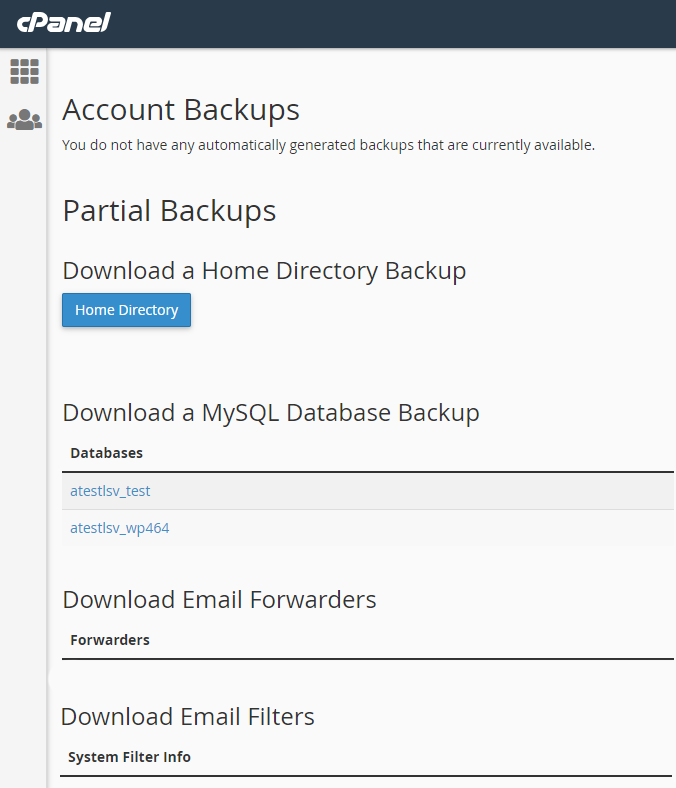
  2. You can download the respective backup by clicking on the link/button.
??????Note

The partial backups downloaded will have the following file type and extension. 

  • Home directory  -  *.tar.gz.
  • Email Forwarders and Filter -  *.net, *.com
  • My SQL Databases -  *.sql

iii. Restore Backup

  1. Under the Account Backups section, you will see restore options.  
  2. In the Select Restore Type section, select what you want to restore. 
    • Home Directory -  Restores the /home directory.
    • MySQL Databases - Restores your databases.
    • Email Forwarders and Filters - Restores your email forwarders or filters.restore type
  3. Click Choose File and select the backup file you want to restore from the path where it is downloaded.
  4. Click Upload to begin the backup restoration.

The backup will be restored. If you face any issues you can get in touch with our support team for assistance.  

Answerable.com